Showing posts with label clone. Show all posts

Sep 29, 2010

Boston Clone - Motorola XT502 Official ROM 2.2 ????

Boston Clone - Motorola XT502 Official ROM 2.2 ???


If you have a XT502 download it and if it works confirm in the comments please!!

Download here

For testing...
Tools:
android-sdk_r07-windows.zip
Oficial Rom 2.1:
Optimus 2.1 oficial rom
A88 2.1 oficial rom
Updates for 2.2:
update-cm-6-11032010-Z71-signed.zip
gapps-mdpi-tiny-20101020-signed.zip
Recovery:
clockwork-z71.img
Original recovery (if you need to solve some brick problems):
recovery.rar
Thanks...

Sep 19, 2010

A60 Android 2.2 Rom - update.zip (Boston clone)

Download Rom 2.2 - Apanda A60


HOW TO

Flash an update.zip
If you ever see a page telling you to 'apply as update.zip' and you think "What?"
Use this guide!

1.Rename the file to update.zip (Just update in windows)
2.Copy it to the root of your SD card (ie not in any folders)
3.Turn off your phone and turn it back on again holding down power and home
4.Select backup and NAND backup (Not NAND + ext) and wait for it to complete
5.Important - Some ROMs require a wipe of your phone.
    Check in the description of your ROM if it requires it.
    As a general rule, if you don't wipe and it requires it then you will be stuck at the bootscreen.
6.If you need to wipe, select wipe data/factory reset > wipe data then wipe dalvik-cache (or something similar)
7.Select apply sdcard:update.zip and wait for that to complete
8.Select reboot phone and you should see your new SPL/ROM/Bootscreen ect.

For testing...
Tools:
android-sdk_r07-windows.zip
Oficial Rom 2.1:
Optimus 2.1 oficial rom
A88 2.1 oficial rom
Updates for 2.2:
update-cm-6-11032010-Z71-signed.zip
gapps-mdpi-tiny-20101020-signed.zip
Recovery:
clockwork-z71.img
Original recovery (if you need to solve some brick problems):
recovery.rar
Thanks...

Sep 9, 2010

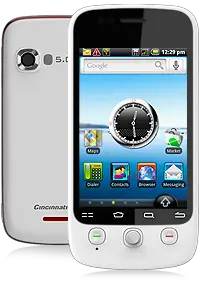
Android 2.1 Cincinnati Bell Blaze (clone do Boston)

ATENÇÃO:

Você verá um erro no seu telefone quando ele voltar, mas não toque em nada. Após um minuto ou dois, a tela fica preta e, em seguida, você verá um texto pequeno branco. Isto significa que as coisas estão indo bem. Se você nunca ver o texto branco e SUT a ferramenta dá um erro, a correcção é de desligar o telefone a partir do seu PC, reiniciar o seu telefone no modo FTM (segure Volume Up, Volume Down e o botão liga / desliga durante o boot), e depois remover o bateria para voltar do modo FTM. Conecte o telefone ao PC, ligue-o novamente e tente executar a ferramenta SUT novamente. Ele deve funcionar dessa vez. Após cerca de 10 minutos, o telefone reiniciar três ou quatro vezes, a ferramenta SUT irá informá-lo que tudo está bem e que a actualização foi aplicada.

Ferramentas para a actualização: x86.rar ou x64.rar

Download da ROM: blaze21.nb0